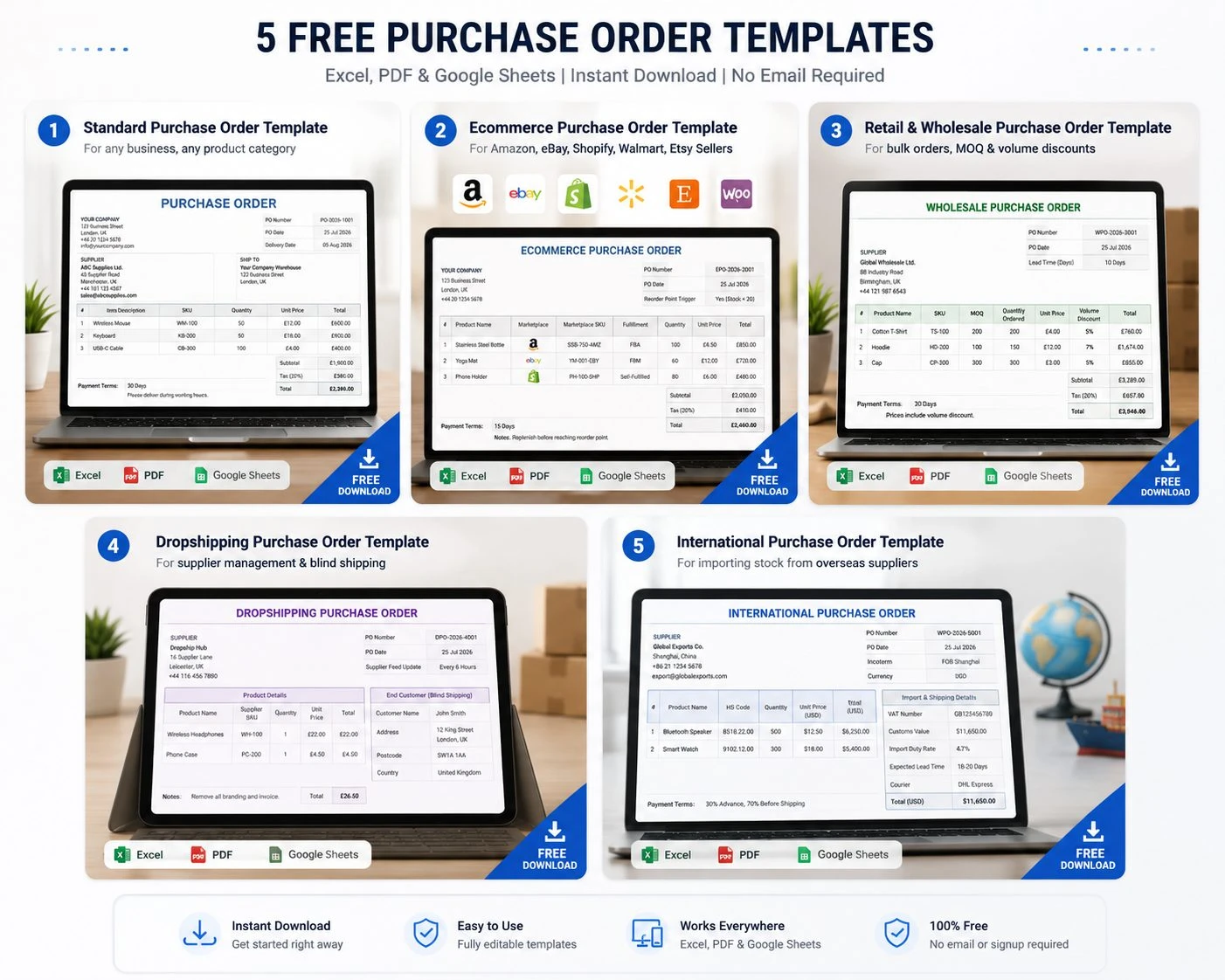
A purchase order template is a pre-formatted document a buyer sends to a supplier to officially request goods or services, specifying product details, quantities, prices, delivery dates, and payment terms. For ecommerce sellers managing stock across Amazon, eBay, Shopify, Walmart Marketplace, Etsy, and WooCommerce, a purchase order is also the first step in the inventory replenishment cycle that keeps every sales channel stocked and in sync.
What is a purchase order template?
A purchase order template is a reusable document that formalizes a buyer’s request to a supplier, covering item descriptions, quantities, unit prices, delivery dates, payment terms, and vendor information. Once a supplier accepts a purchase order, it becomes a legally binding agreement between both parties.
Download 5 Free Purchase Order Templates (No Email Required)
Every template below is available immediately, no email address required. Gating a simple document behind a signup form is one of the fastest ways to lose a visitor who just wants to get back to running their business, so each file is a direct download in three formats.
Pick the one that matches how your business actually buys stock, rather than defaulting to the first result. A retailer negotiating MOQs with a single wholesale supplier has very different fields to track than a dropshipper coordinating blind shipments to end customers, and using the wrong template usually means adding fields back in by hand later. Once you’ve picked a template, jump to the step-by-step filling guide further down the page.
-
Standard Purchase Order Template
Who it’s for: any business, any product category
Key fields: PO number, vendor info, ship-to address, item table, subtotal, tax, total, notes
What fields does a standard purchase order template include?
A standard purchase order template includes a unique PO number, buyer and vendor contact details, itemized product descriptions with quantities and unit prices, shipping destination and expected delivery date, payment terms, and a notes or terms section. The total amount is calculated automatically in Excel and Google Sheets versions.
-
Ecommerce Purchase Order Template (Amazon, eBay, Shopify, Walmart)
Who it’s for: multichannel sellers managing stock across multiple platforms
Extra fields: sales channel, fulfillment method (FBA/FBM/self-fulfilled), reorder point trigger, marketplace SKU
Why it matters: when a PO is tied to a specific channel’s reorder point, restocking happens before a stockout, not after.
Do Amazon and eBay sellers need a special purchase order template?
Yes. Multichannel sellers need purchase order templates that capture channel-specific information, such as which marketplace triggered the reorder, the fulfillment method (Amazon FBA or FBM, self-fulfilled), and the marketplace SKU. This connects the PO to the inventory management system that tracks stock levels across every connected sales channel simultaneously.
-
Retail and Wholesale Purchase Order Template
Who it’s for: retailers buying in volume from suppliers with MOQ requirements
Extra fields: minimum order quantity (MOQ), volume discount, lead time in days, supplier reference number
Worked example: A seller orders 200 units of a product from a supplier with a 10-day lead time and a stated MOQ of 200 units. Because the order meets the MOQ exactly, the supplier applies a 5% volume discount, reducing the per-unit price from $4.00 to $3.80 and bringing the total order value from $800 to $760. The PO records both the original and discounted unit price, so the discrepancy is expected rather than flagged during three-way matching when the invoice arrives.
What is MOQ in a purchase order?
MOQ stands for Minimum Order Quantity, the smallest number of units a supplier will accept in a single purchase order. Including MOQ in a PO template ensures every order meets the supplier’s production or logistics threshold, which also often unlocks volume discount pricing.
-
Dropshipping Purchase Order Template
Who it’s for: dropshipping sellers managing supplier stock feeds
Extra fields: supplier feed update frequency, blind shipment required, end customer name and delivery address, dropship supplier code
Key note: a dropshipping PO tracks supplier reliability, not physical stock held by the seller.
Does a dropshipping business need a purchase order template?
Yes. A dropshipping purchase order template differs from a standard PO because the seller never holds the physical stock. The template needs to capture the end customer’s delivery address for blind shipment, confirm whether supplier branding should be removed, and note how frequently the supplier updates their stock feed, since a delayed feed update is the primary cause of overselling in dropshipping.
-
International Purchase Order Template (UK and EU Sellers)
Who it’s for: UK-based ecommerce sellers importing stock from overseas suppliers
Extra fields: HS tariff code, Incoterms (FOB, CIF, DAP, DDP), VAT number, declared customs value, import duty rate, expected lead time including customs clearance, courier (DHL/Royal Mail)
Key note: a 14-day domestic lead time becomes 18 to 20 days once customs delays are factored in, which changes the safety stock calculation directly.
What is an Incoterm on a purchase order?
An Incoterm (International Commercial Term) is a standardized code on a purchase order that defines who is responsible for shipping costs, insurance, and the risk of loss between buyer and seller. Common Incoterms include FOB (Free On Board, where risk transfers when goods leave the supplier’s port), CIF (Cost, Insurance, Freight, where the supplier covers shipping and insurance to the destination port), and DDP (Delivered Duty Paid, where the supplier covers all costs including import duty and VAT to the buyer’s door).
What Is a Purchase Order?
A purchase order (PO) is a formal document a buyer sends to a vendor to request specific goods or services. It specifies product descriptions, quantities, agreed prices, delivery dates, shipping instructions, and payment terms. Once a vendor accepts a purchase order, it becomes a legally binding contract. For ecommerce and retail businesses, purchase orders are also the core document that triggers inventory replenishment.
A purchase order exists to remove ambiguity from a transaction before any goods change hands. Rather than a verbal agreement or an informal email, it puts the exact quantity, price, and delivery expectation in writing, protecting both the buyer and the supplier if a dispute arises later. For a business ordering from the same supplier every month, this might feel like unnecessary paperwork, but the paper trail is exactly what makes a disagreement over pricing or quantity resolvable in minutes rather than becoming a drawn-out back-and-forth with no clear record to point to.
This matters even more once a business sells across several channels at once. A seller restocking the same product for Amazon FBA, a Shopify store, and an eBay listing needs a single, unambiguous record of exactly what was ordered and when it’s expected, otherwise it becomes very easy to lose track of which shipment is meant to cover which channel’s demand.
How it differs from an invoice:
A purchase order is created by the buyer before the transaction, an invoice is created by the supplier after delivery.
How it differs from a sales order:
a purchase order and a sales order describe the same transaction from opposite sides, the PO is the buyer’s request, the sales order is the supplier’s confirmation that they can fulfill it.
Legal status once accepted:
once a supplier formally accepts a PO, it becomes a binding contract, not just a request.
What is the difference between a purchase order and an invoice?
A purchase order is sent by the buyer before a transaction to request goods or services. An invoice is sent by the supplier after delivery to request payment. A purchase order initiates the procurement process; an invoice closes it. In a three-way matching process, the purchase order, the delivery receipt, and the supplier invoice are all matched before payment is approved.
Is a purchase order legally binding?
Yes, once a supplier formally accepts a purchase order, it becomes a legally binding contract between buyer and seller. It locks in agreed prices, quantities, delivery dates, and payment terms, protecting both parties if a dispute arises. A purchase order that has not been formally accepted by the supplier is still an offer rather than a binding agreement.
Key Components of Every Purchase Order
| Component |
Description |
Why It Matters |
| PO Number |
Unique identifier for each order |
Enables tracking, matching, and audit trail |
| Vendor Information |
Supplier name, address, contact |
Confirms correct supplier and delivery routing |
| Buyer Information |
Your business name and address |
Legally identifies the purchasing entity |
| Ship-To Address |
Warehouse or fulfillment center address |
Ensures delivery reaches the right location |
| Order Date |
Date PO is issued |
Sets the procurement timeline |
| Delivery Date |
Expected receipt date |
Determines lead time and safety stock calculation |
| Item Description |
Product name, SKU, specifications |
Prevents ambiguity and supplier errors |
| Quantity |
Units ordered |
Triggers MOQ check and volume pricing |
| Unit Price |
Agreed price per unit |
Locks in pricing before delivery |
| Total Amount |
Quantity × unit price plus tax and shipping |
Financial commitment confirmation |
| Payment Terms |
Net 30, Net 60, COD, etc. |
Governs cash flow and accounts payable |
| Notes / Terms |
Special conditions, quality requirements |
Records any agreed deviations |
What must a purchase order include to be valid?
A valid purchase order must include a unique PO number, the buyer and seller’s names and contact details, a clear description of the goods or services being ordered with quantities and agreed unit prices, the expected delivery date, payment terms, and the delivery address. For international orders, HS tariff codes and Incoterms should also be included.
Types of Purchase Orders
What are the different types of purchase orders?
The four main types of purchase orders are: Standard POs (one-time orders for specific goods), Blanket POs (covering multiple deliveries of the same product over an agreed period), Contract POs (establishing terms and conditions without specifying quantities), and Planned POs (scheduling future purchases based on predicted demand). Ecommerce sellers most commonly use Standard and Blanket POs.
- Standard PO – a one-time, specific order for a defined quantity of goods, most common for first-time or occasional suppliers. Example: a seller placing a single order for 500 units of a new product ahead of a launch.
- Blanket PO – covers multiple deliveries of the same product from the same supplier over an agreed period, useful for sellers who reorder the same SKUs monthly. Example: a supplier agreement to deliver 1,000 units every month for the next six months at a locked-in price, issued under one blanket PO rather than six separate ones.
- Contract PO – establishes agreed pricing and terms with a supplier without confirming exact quantities upfront, quantities are specified in individual releases against the contract. Example: a seller locks in a unit price and payment terms with a manufacturer for the year, then raises individual release orders against that contract as actual demand becomes clear.
- Planned PO – schedules future purchases based on forecasted demand rather than a current, confirmed need. Example: a seller anticipating a seasonal spike raises a planned PO two months ahead of a peak sales period, based on the previous year’s demand data, so stock arrives in time rather than after the spike has already started.
How to Fill In a Purchase Order Template Step by Step
- Enter your company name, address, and contact details in the buyer section
- Enter your supplier’s name, address, and account reference in the vendor section
- Assign a unique PO number using a consistent format (e.g. PO-2026-001)
- Enter the order date and expected delivery date
- Fill in item descriptions, SKU codes, quantities, and agreed unit prices
- Let the template calculate subtotals, tax, and the total automatically
- Add any special terms, quality conditions, or shipping instructions in the notes section
- Have the PO signed or approved by the authorized person in your business
- Send the PO to your supplier and request written acceptance
- File a copy for three-way matching when the goods arrive and the invoice is received
How do I create a purchase order in Excel?
Download a free purchase order template in Excel, fill in your company details and supplier information, assign a sequential PO number, enter item descriptions with quantities and unit prices (the template calculates totals automatically), add delivery dates and payment terms, then save a copy and send it to your supplier as a PDF. Most Excel PO templates include an auto-sum formula so you do not need to calculate totals manually.
Purchase Order Best Practices for Ecommerce and Multichannel Sellers
- Always use a consistent PO numbering format for audit trail. A format like PO-2026-001 makes it possible to find any order in seconds, months later, rather than searching through email threads.
- Tie every PO to a calculated reorder point, not a gut feel. Ordering “when it looks low” leads to both stockouts and overstock, since it doesn’t account for actual sell-through rate or lead time.
- Include the specific sales channel that triggered the reorder in ecommerce POs. Without this, it’s easy to lose track of whether a shipment was meant to cover an Amazon FBA replenishment or a Shopify restock, especially once several POs are in flight at once.
- Record actual supplier lead times including delays, not best-case estimates, since these feed the safety stock formula directly. A supplier who quotes a 10-day lead time but regularly delivers in 14 will cause repeat stockouts if the safety stock calculation is based on the quoted figure instead of the real one.
- Always request written acceptance from the supplier before considering the PO confirmed. A PO that hasn’t been formally accepted is still just a request, not a guarantee of stock or pricing.
- Retain copies for three-way matching: the PO, the goods receipt note (GRN), and the supplier invoice. Keeping all three on file is what makes a pricing discrepancy resolvable in minutes rather than becoming a dispute with no clear record to settle it.
What is three-way matching in purchase orders?
Three-way matching is an accounts payable process that compares three documents before approving a supplier payment: the original purchase order, the goods receipt note (confirming what was actually delivered), and the supplier’s invoice. If all three match on quantities and prices, the payment is approved. If they do not match, the discrepancy is investigated before payment is released.
Common Purchase Order Mistakes to Avoid
Even sellers with a solid template in place run into the same handful of problems repeatedly:
- Reusing or skipping PO numbers. This breaks the audit trail and makes three-way matching far harder than it needs to be, since two orders can no longer be told apart in a search.
- Ordering based on how stock “looks” rather than a calculated reorder point. This is the single most common cause of both stockouts and excess inventory tying up cash.
- Treating a sent PO as confirmed before the supplier has accepted it. Until a supplier formally agrees to a PO, pricing and delivery dates aren’t guaranteed, and planning around them as if they were is a common cause of missed restocks.
- Not recording real supplier lead times. Using a supplier’s quoted lead time instead of their actual, historical delivery time understates how much safety stock is really needed.
- Losing track of which PO covers which sales channel. For multichannel sellers this is especially costly, since a shipment meant to restock Amazon FBA can easily get allocated against Shopify demand instead if the channel isn’t recorded on the PO itself.
- Not retaining documents for three-way matching. Without the PO, the goods receipt note, and the invoice all on file, a pricing dispute with a supplier becomes far harder to resolve.
How Purchase Orders Connect to Inventory Management
A purchase order isn’t just a procurement document, it’s the trigger for an entire inventory replenishment cycle. The
reorder point formula determines when a PO should be raised, not guesswork: average daily usage multiplied by supplier lead time, plus a safety stock buffer.
For multichannel sellers, this matters more than it might first appear. When stock on Amazon, eBay, and Shopify is tracked as one unified count rather than three separate ones, the reorder point reflects real combined demand across every channel, not just whichever platform happens to be checked first. Once stock arrives against a PO, the
inventory management software should update every connected sales channel simultaneously, closing the loop between procurement and sales.
Manual PO processes tend to break down past roughly 20 orders per month per channel. Past that point, spreadsheet-based tracking creates version control problems, approval gaps, and mismatched invoices that eat far more time than the process was ever meant to save.
How does a purchase order connect to inventory management?
A purchase order triggers the inventory replenishment process. When stock falls to its calculated reorder point (average daily usage multiplied by supplier lead time, plus safety stock), a PO is raised to the supplier. When the goods arrive, the inventory management system updates stock levels across every connected sales channel, closing the replenishment cycle. For multichannel sellers, this process needs to happen automatically across Amazon, eBay, Shopify, Walmart, Etsy, and WooCommerce simultaneously, rather than being updated manually per channel.
When to Move Beyond Templates: Purchase Order Management Software
Templates work well up to roughly 20 POs per month on a single sales channel. Past that volume, manual tracking starts to create real problems: version control issues when multiple people edit the same spreadsheet, approval steps that get skipped under time pressure, and invoices that don’t quite match what was originally ordered.
Purchase order management software automates the creation, approval, tracking, and matching process end to end. For multichannel ecommerce sellers specifically, PO software that connects directly to inventory management eliminates the lag between stock arriving in the warehouse and every sales channel reflecting the updated count, the exact gap where overselling happens.
What is purchase order management software?
Purchase order management software automates the creation, approval, tracking, and reconciliation of purchase orders. For ecommerce businesses, it connects the PO process directly to inventory management, so when stock arrives against a purchase order, every connected sales channel updates automatically without manual intervention. This eliminates the synchronization lag between stock receipt and marketplace listing availability that causes overselling.
StockKonnect’s
inventory management software connects purchase order management directly to real-time inventory sync across Amazon, eBay, Shopify, Walmart, Etsy, and WooCommerce, along with
listing management so restocked items go live across every channel the moment stock is received.
For a seller running one channel with occasional restocks, a well-organized template is genuinely enough, there’s no need to add software into the process before it’s solving a real problem. But once purchasing crosses roughly 20 POs a month, or once stock is being replenished across three or more sales channels at the same time, the manual version of this process starts costing more time than it saves. That’s the point where connecting purchase orders directly to inventory management stops being a nice-to-have and starts being the difference between restocking on schedule and finding out about a stockout after a customer has already tried to buy something that wasn’t there.
Choosing the Right Template for Your Business
If you’re not sure which of the five templates above fits, a simple rule of thumb: start with the Standard template if you’re ordering from a single supplier occasionally, move to the Ecommerce template the moment you’re managing stock across more than one sales channel, and add the International template’s customs fields only if you’re actually importing from overseas, since HS codes and Incoterms add complexity that isn’t needed for domestic orders. Dropshippers and high-volume wholesale buyers should use their dedicated templates from day one, since retrofitting a standard PO with MOQ or blind-shipment fields after the fact is more work than starting with the right one.
Frequently Asked Questions
What is the difference between a purchase order and a sales order?
A purchase order is created by the buyer and sent to the supplier to initiate a purchase. A sales order is created by the supplier in response to confirm they can fulfill the request. They describe the same transaction from opposite sides: the PO from the buyer’s perspective, the sales order from the seller’s perspective.
Can I use a purchase order template in Google Sheets?
Yes. All five templates on this page are available as Excel files that open directly in Google Sheets, where the auto-sum formulas continue to work. Google Sheets also makes it straightforward to share the completed PO with a supplier via a link rather than an email attachment.
How do I number purchase orders?
Use a consistent sequential format that is unique to your business. A common format is PO-YEAR-NUMBER, for example PO-2026-001 through PO-2026-999. Some businesses include a supplier code prefix (SUPP01-PO-001) if they manage multiple suppliers. Whatever format you choose, never reuse a PO number, since duplicates create audit and payment matching problems.
What happens after a purchase order is sent?
After a purchase order is sent to a supplier, the supplier reviews it and either accepts it (turning it into a binding contract), queries specific terms, or rejects it. Once accepted, the supplier fulfills the order and ships the goods with a delivery note. The buyer matches the delivery note and supplier invoice against the original PO in a three-way matching process before releasing payment.
Do I need a purchase order for every supplier transaction?
For ecommerce businesses ordering stock regularly, yes. A PO creates a paper trail for every purchase, locks in agreed prices before delivery, and provides the reference document needed for three-way matching at payment stage. Businesses without a formal PO process often discover pricing discrepancies or unauthorized spend only when invoices arrive, by which point the goods have already been received.